ATS-Friendly Engineering and Architecture Resume Examples
A strong resume can help you take the next step in your engineering or architecture career. It should clearly show your technical skills, project experience, and achievements.Our Engineering and Architecture resume examples give you the guidance you need to get started. Explore ATS-friendly templates and learn how to create a professional resume that is easy for recruiters to read and built for today's hiring process.



Explore Related Resume Examples
Every engineering and architecture job has different resume requirements. Browse our resume examples to learn how to present your experience, technical skills, and achievements for the role you want.

How to Write an Engineering and Architecture Resume
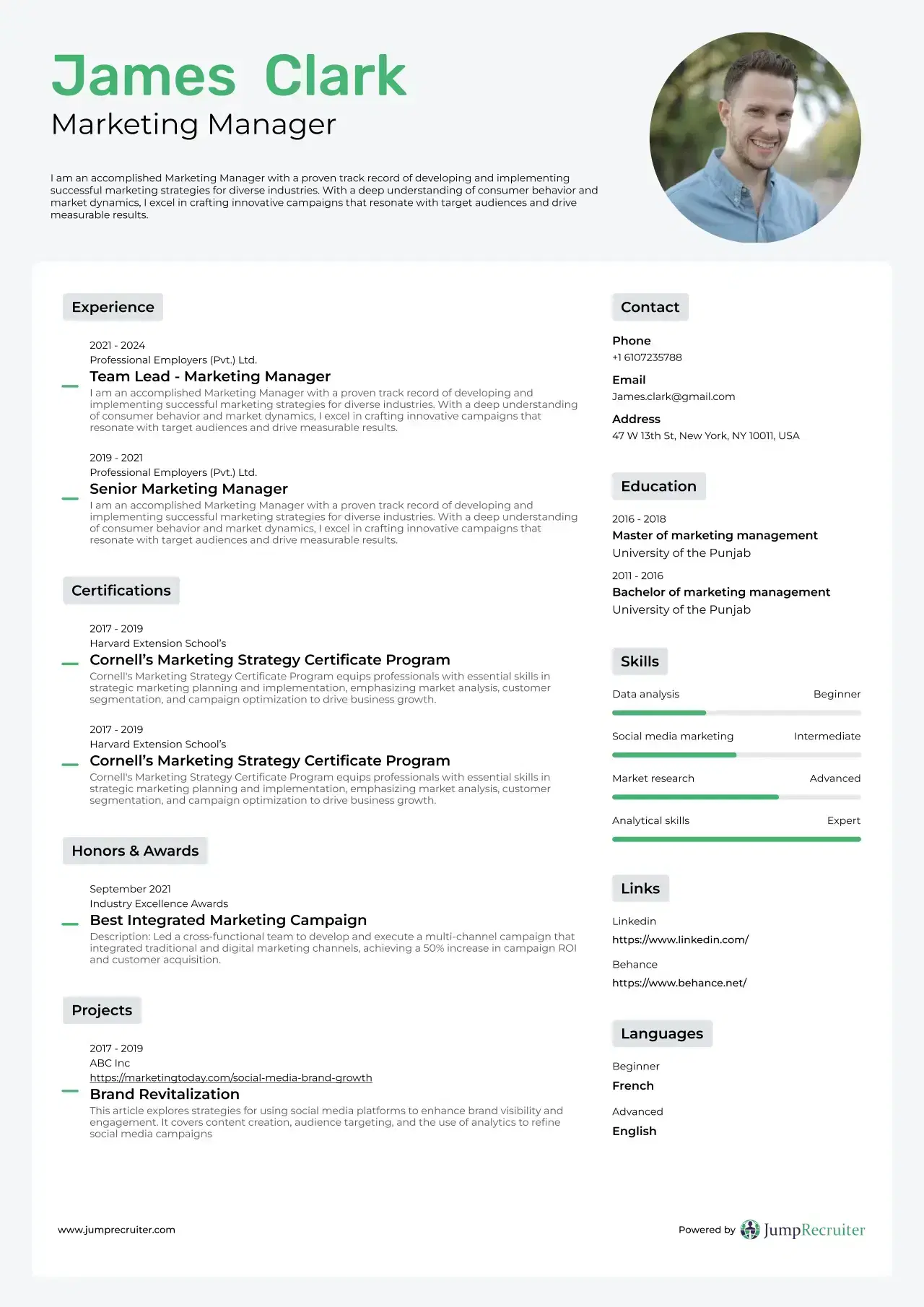
A well-written resume helps employers quickly understand your skills and experience. Our professionally designed resume examples show you how to organize your resume the right way. Use the tips below to create a clear, ATS-friendly resume that stands out.
Start with a Strong Professional Summary
Write a short summary at the top of your resume. Mention your years of experience, key technical skills, and the type of engineering or architecture role you're looking for. Keep it to two or three sentences.
Include Your Technical Skills
Create a separate skills section so recruiters can find it easily. Include software, tools, and technical skills that match the job description, such as AutoCAD, Revit, SolidWorks, MATLAB, or Python.
Add Your Best Projects and Achievements
Don't just list your daily tasks. Include projects that show your skills and the results you achieved. Use numbers when possible, such as cost savings, project budgets, or time saved.
List Your Education and Certifications
Include your degree, licenses, and certifications in a clear section. If you have certifications like PE, EIT, LEED, or OSHA, make sure they are easy to find.
Use ATS-Friendly Resume Templates
Our ATS-friendly resume templates help you create a clean and professional resume. With simple layouts and clear sections, it's easy to organize your skills, projects, and experience. A well-formatted resume is easier for recruiters and applicant tracking systems to read.
Why Use Our Engineering and Architecture Resume Examples?
Writing an engineering resume is about more than listing your daily tasks. Employers want to see how you solved problems, improved processes, and helped your team succeed.
Our best resume examples help you:
- Show your engineering experience clearly
- Highlight measurable achievements
- Display certifications and licenses
- Organize technical skills
- Present project leadership
- Build an ATS-friendly resume
Every example follows current hiring standards and can be customized for your career goals.
Professional Resume Templates for Technical Careers
A clean resume is easier to read. It also helps recruiters find your most important information faster. That's why our custom resume templates are designed for engineering and architecture professionals.
Each template uses a simple, ATS-friendly layout. You can easily organize your skills, projects, certifications, and work experience.
Our templates help you:
- Organize your work history
- Highlight technical skills and projects
- Show certifications clearly
- Present achievements in a simple format
- Create an ATS-friendly resume
- Make a great first impression
Apply with confidence to engineering firms, construction companies, manufacturers, government agencies, and technology companies.
Build Your Resume Faster with Our AI Free Resume Builder
Writing a resume from scratch can take a lot of time, especially if you're not sure what to include. Our AI free resume builder makes the process simple by guiding you through each section, one step at a time.
Whether you're applying for your first engineering job or your next career move, you can create a professional, ATS-friendly resume in just a few minutes.
With our builder, you can:
- Create your resume step by step
- Choose from professional resume layouts
- Highlight your skills, projects, and achievements
- Easily edit or update your resume anytime
- Download your finished resume when you're ready
- Build resumes for different engineering and architecture roles
Instead of worrying about formatting or what to write, you can focus on applying for jobs with a resume that clearly shows your strengths and experience.
Engineering Resume Writing Tips
A good engineering resume does more than list your job duties. It shows employers how you solved problems, completed projects, and added value to your team. Keep your resume clear, easy to read, and focused on your biggest achievements.
Here are a few simple ways to improve your resume.
Show Your Results with Numbers
Numbers help employers understand the impact of your work. Whenever possible, include measurable results instead of general statements.
For example:
- Reduced production costs by 18%
- Managed projects worth $5 million
- Improved system efficiency by 25%
- Completed projects ahead of schedule
- Reduced equipment downtime across manufacturing operations
Even small improvements can make your resume stronger.
Highlight Your Technical Skills
Recruiters want to know which tools and software you can use. Create a dedicated skills section so they can quickly find this information.
You can include skills such as:
- AutoCAD
- SolidWorks
- Revit
- MATLAB
- Civil 3D
- Primavera P6
- SAP
- Python
- C++
- PLC Programming
- BIM Software
Only include skills that are relevant to the job you're applying for.
Include Your Best Projects
Your projects often show more than your job title. They help employers understand what you have worked on and what you can do.
For each major project, mention:
- Your role on the project
- The tools or software you used
- The problem you solved
- The final result
Keep each project description short and focused on your contribution.
Add Relevant Certifications
Certifications can help your resume stand out, especially for technical roles. They also show that you're committed to learning and growing in your field.
Some common certifications include:
- Professional Engineer (PE)
- Engineer in Training (EIT)
- LEED Accredited Professional
- OSHA Certifications
- PMP Certification
- Autodesk Certifications
List your certifications in a separate section so employers can find them easily.
Customize Your Resume for Every Job
Avoid sending the same resume to every employer. Read the job description and update your resume to match the role.
You can customize your:
- Professional summary
- Skills section
- Work experience
- Project descriptions
- Keywords from the job posting
A tailored resume is more likely to pass ATS screening and catch a recruiter's attention.
Who Can Use These Resume Examples?
Our resume examples are made for job seekers at every stage of their engineering and architecture careers. They can help you create a resume for roles such as:
- Civil Engineer
- Mechanical Engineer
- Electrical Engineer
- Software Engineer
- Structural Engineer
- Chemical Engineer
- Environmental Engineer
- Industrial Engineer
- Aerospace Engineer
- Architect
- Landscape Architect
- Interior Architect
- Engineering Technician
- Project Engineer
- Design Engineer
- Construction Engineer
- CAD Designer
- BIM Specialist
- Survey Engineer
- Entry-Level Engineering Graduate
Whether you're looking for your first engineering job or your next career opportunity, you'll find resume examples that match your skills and experience.
Upgrade your resume in minutes
Use this AI resume builder to create an ATS-friendly engineering resume and get more interviews.
Related Resume Examples
FAQs That Simplify Your Journey
What should I include on an engineering resume?
A strong engineering resume should include a short professional summary, your technical skills, work experience, education, certifications, and key projects. Use numbers whenever possible to show your results, such as project budgets, cost savings, or performance improvements. Tailor your resume to each job you apply for.
Are these engineering and architecture resume examples ATS-friendly?
Yes. Our Engineering and Architecture resume examples follow ATS best practices. They use clear formatting and standard section headings, making it easier for applicant tracking systems and recruiters to review your resume.
Can students and recent graduates use these resume examples?
Yes. These resume examples are helpful for students, recent graduates, and experienced professionals. You can use them to learn how to present your education, internships, projects, and work experience in a professional way.
What skills should I add to an engineering resume?
Include skills that match the job you're applying for. Common examples include AutoCAD, Revit, SolidWorks, MATLAB, Python, Civil 3D, BIM, project management, and problem-solving. Always choose skills that are relevant to the position.
How can Jump Resume Builder help me create my resume?
Jump Resume Builder makes resume writing easier with best resume examples, professional custom resume templates, and an AI free resume builder. You can quickly create an ATS-friendly resume that highlights your skills, experience, and achievements for engineering and architecture jobs.
Create Your
Engineering Resume Today
If you're not sure how to write a resume, don't worry. We've made the process quick and easy. Browse our best resume examples and use our AI free resume builder to create an ATS-friendly resume in just a few minutes. Spend less time writing your resume and more time applying for engineering and architecture jobs with confidence.