- Who’s Actually Reading Your Resume?
- Step 1: Choose Your Resume Format
- Step 2: Write Your Contact Header
- Step 3: Write a Resume Summary (or Objective)
- Step 4: Detail Your Work Experience
- Step 5: Add Your Education
- Step 6: Build Your Skills Section
- Hard Skills
- Soft skills
- Step 7: Add Optional Sections (When They Help)
- Formatting Your Resume So the ATS Can Read It
- Section Order and Layout
- A Complete Resume Example
- Summary
- Experience
- Education
- Skills
- Certifications
- Copy This Resume Template
- Summary
- Experience
- Education
- Skills
- Certifications
- Final Checklist Before You Submit
- Frequently Asked Questions
- How long should a resume be?
- Do I need a resume if I don’t have work experience?
- Should I include references on my resume?
- What file format should I submit my resume in?
- How do I make my resume stand out without hurting ATS readability?
You send out one application, then another, and another. After a while, you’ve lost count. But the response is almost always the same: silence.
It’s easy to start wondering if something’s actually wrong with you as a candidate. Most of the time, it isn’t. It’s the resume. Either it’s not getting past the ATS, or it’s landing in front of a recruiter and failing to make the case for you in the seven seconds they’ll actually give it.
Here’s the problem with most resume advice: it tells you what to include, but not why it matters or how it actually gets used. This guide fixes that. We’ll walk through every section in seven steps, show you a complete example resume, hand you a copyable template, and cover exactly how to format things so both a hiring manager and an applicant tracking system (ATS) can read it properly.
Who’s Actually Reading Your Resume?
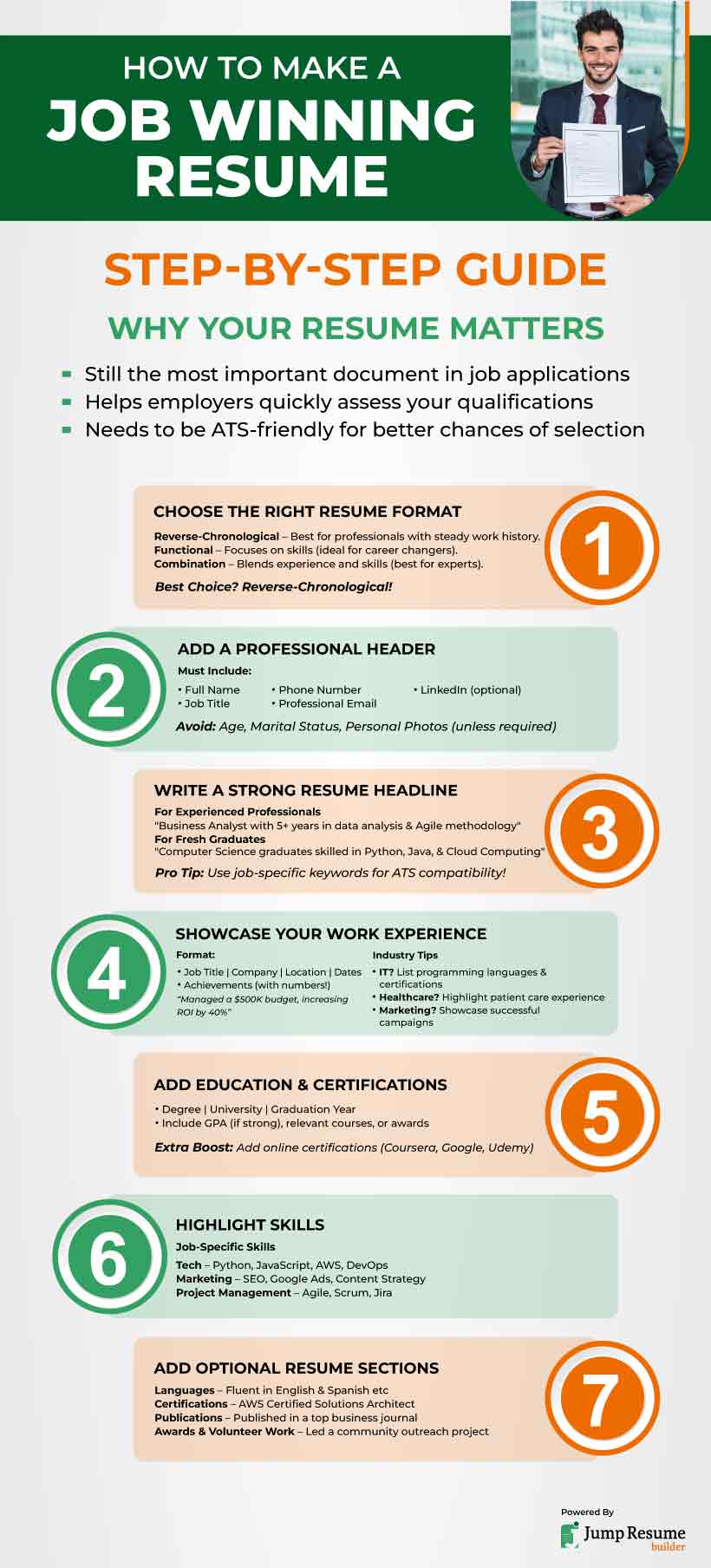
Before we get into the how, it helps to know your audience. You actually have two.
First is the ATS. Software companies use it to filter applications before a human ever opens them. It scans for keywords, checks your formatting, and decides whether you clear the first hurdle.
Second is the recruiter or hiring manager. They spend a matter of seconds on an initial scan. That means your most important information has to be easy to find immediately, not buried on page two.
Every step below is built around passing both checks: get through the ATS, then convince a real person fast.
Step 1: Choose Your Resume Format
Your resume format is the skeleton everything else hangs on. Get this right first, and the rest gets a lot easier.
There are three main formats:
Chronological: This format lists your work history from most recent to oldest. Best if you have steady experience in your field.
Functional: It leads with skills instead of work history. Useful if you’re switching careers or have gaps in your work timeline.
Combination: It blends both, giving equal weight to skills and job history.
For most job seekers, chronological is the safest bet. It’s what recruiters expect, and it’s the format ATS software parses most reliably.
Step 2: Write Your Contact Header
Start with the basics, front and center:
- Full name
- Professional title (e.g., “Marketing Coordinator”)
- Phone number
- Professional email address
- City and state (a full street address isn’t necessary anymore)
- LinkedIn URL, if you have one
Keep this section clean. Skip your age, marital status, or a photo. Employers don’t expect these, and including them can work against you.
Step 3: Write a Resume Summary (or Objective)
This is a 2–3 sentence introduction sitting right under your header. It’s the first thing a recruiter reads closely, so make it count.
- If you have work experience, write a summary. It is a short pitch on what you do and what you’re good at.
- If you’re just starting out, write an objective instead. It shows what you’re looking for and what you bring to the table.
Example summary: “Marketing coordinator with 4 years of experience running email and social campaigns. Grew newsletter subscribers by 38% in one year and managed a $50K paid ad budget.”
Example objective: “Recent marketing graduate with hands-on experience in social media management and content creation from internships and coursework, looking to bring analytical and creative skills to an entry-level marketing role.”
Both examples lead with something specific. “Hardworking” and “team player” don’t tell a recruiter anything. Numbers and outcomes do.
Need more direction here? Our guide to writing a resume objective has more examples for different career stages.
Step 4: Detail Your Work Experience
This is the heart of your resume, and where most of a recruiter’s attention lands.
For each job, list:
- Job title
- Company name
- Location
- Dates employed (month/year is fine)
- 3–5 bullet points on what you did and achieved
The key: don’t just list duties. Show results.
Weak: “Responsible for managing social media accounts.”
Strong: “Grew Instagram following by 5,000+ followers in six months through a consistent content calendar and paid promotion.”
Start every bullet with a strong action verb. A few reliable ones by category:
Leadership: led, managed, coordinated, launched
Communication: presented, negotiated, drafted, collaborated
Technical: built, developed, engineered, automated
Results: increased, reduced, improved, generated
Where you can, attach a number to the result. Think revenue, percentage, headcount, or time saved. Any of these makes a bullet point far more convincing than a vague description of your role.
If you were promoted at a company, show that progression clearly instead of listing it as a separate job. Our guide to showing promotions on a resume covers exactly how to format that.
And if you don’t have much paid experience yet, that’s fine — internships, class projects, and volunteer work all belong here. This guide for writing a resume with no experience is built specifically for that situation.
Step 5: Add Your Education
Keep this section simple:
- Degree and major
- School name
- Graduation date (or expected date)
- GPA, if it’s 3.5 or higher
- Relevant coursework, honors, or awards (mainly useful for recent grads)
If you’ve been out of school for more than 10 years, this section can shrink to just a couple of lines. Your work experience is doing the heavy lifting by then.
Wondering how to handle unfinished degrees or double majors? See our complete guide to listing education on a resume.
Step 6: Build Your Skills Section
Your skills section has one job: prove you have what the job posting is asking for.
Split it into two types:
Hard Skills
These are specific, teachable abilities (software, tools, certifications, languages)
Hard skills examples by field:
Marketing: Google Analytics, HubSpot, SEO, Meta Ads Manager, email marketing platforms
Finance: Excel (pivot tables, VLOOKUP), QuickBooks, financial modeling, SAP
IT/Software: Python, SQL, AWS, Git, API integration
Healthcare: EHR systems (Epic, Cerner), patient scheduling, medical billing codes
Project management: Asana, Jira, Agile/Scrum, budget management
Pull hard skills straight from the job description where you genuinely have them. This is one of the fastest ways to clear ATS keyword filters, since the system is often just checking for overlap between your resume and the posting. If a posting says “proficient in Salesforce” and you are, use that exact phrase. Don’t swap it for a synonym the ATS might not catch.
Soft skills
These show how you work (communication, adaptability, problem-solving)
Soft skills examples: communication, adaptability, problem-solving, time management, collaboration, conflict resolution, leadership.
Soft skills are easy to list and easy to ignore, because anyone can claim them. The fix is to never let them stand alone. Pair each one with proof somewhere else on your resume.
Weak: “Skills: Strong communicator, team player”
Better: List “communication” and “cross-functional collaboration” in your skills section, then back it up in your experience bullets. You could say:
“Presented quarterly performance results to senior leadership”
“Collaborated with design, sales, and support teams to launch a new onboarding flow.”
Want a longer list to pull from? Our roundup of the best skills to put on a resume breaks skills down by industry.
Step 7: Add Optional Sections (When They Help)
If you have space and something relevant, consider adding:
- Certifications (e.g., PMP, Google Analytics, AWS)
- Languages
- Volunteer experience
- Awards or publications
Add these if they support your case for the specific job. A page packed with irrelevant extras dilutes the sections that actually matter.
Formatting Your Resume So the ATS Can Read It
Now that you know how to make a resume, learn to optimize it for AI screening tools.
Do:
- Use a standard font (Arial, Calibri, Times New Roman)
- Stick to a single-column layout for anything you submit through an online application
- Use standard section headers (“Experience,” not “Where I’ve Made an Impact”)
- Save as a PDF unless the application specifically asks for Word
Avoid:
- Tables, text boxes, and multi-column layouts (many ATS platforms can’t parse them correctly)
- Putting key info in headers or footers — some systems skip these entirely
- Images, icons, or graphics standing in for text
- Unusual fonts or heavy visual formatting
For a closer look at how these systems actually work, read our complete guide to ATS resumes.
Section Order and Layout
Once every section is written, the order you put them in matters too. As a general rule:
- Header
- Summary/Objective
- Work Experience
- Skills
- Education
- Optional sections
If you’re a student or recent grad with limited work experience, move Education above Work Experience.
For a closer look at organizing and titling each section, see our guides on resume layout and resume sections and categories.
A Complete Resume Example
Here’s what all of this looks like put together, using the chronological format:
Austin, TX | (512) 555-0147 | jordan.rivera@email.com | linkedin.com/in/username
Summary
Marketing coordinator with 4 years of experience running email and social campaigns for B2B SaaS companies. Grew newsletter subscribers by 38% in one year and managed a $50K paid ad budget with a consistent 3.2x return on ad spend.
Experience
- Grew email subscriber list by 38% in 12 months through redesigned lead magnets and a weekly newsletter
- Managed $50K annual paid social budget across LinkedIn and Meta, maintaining a 3.2x return on ad spend
- Built and launched a customer referral program that generated 60+ qualified leads in its first quarter
- Collaborated with the sales team to produce 15+ pieces of case study content used throughout the sales cycle
- Coordinated content calendar across 4 social platforms, increasing engagement by 22% year over year
- Assisted in planning and executing 3 virtual product launch events, each drawing 200+ attendees
- Wrote and edited blog content that grew organic traffic by 15% over 18 months
Education
Relevant coursework: Digital Marketing, Consumer Behavior, Public Relations
Skills
HubSpot, Google Analytics, Meta Ads Manager, Canva, email marketing, campaign management, copywriting, cross-functional collaboration
Certifications
HubSpot Content Marketing Certification (2023)
Notice what this resume example does: every bullet leads with an action verb, almost every line has a number attached, and nothing is vague. That’s the difference between a resume that gets read and one that gets skimmed and set aside.
Copy This Resume Template
Prefer to start from a blank structure instead of a resume example? Copy this resume template:
[City, State] | [Phone Number] | [Email Address] | [LinkedIn URL]
Summary
[2-3 sentences: your role/experience, your top skill or achievement, a measurable result]
Experience
- [Action verb] + [what you did] + [result/number]
- [Action verb] + [what you did] + [result/number]
- [Action verb] + [what you did] + [result/number]
- [Action verb] + [what you did] + [result/number]
- [Action verb] + [what you did] + [result/number]
Education
[GPA, if 3.5+] | [Relevant coursework, if applicable]
Skills
[Hard skill], [Hard skill], [Hard skill], [Soft skill], [Soft skill]
Certifications
[Certification Name] | [Year]
Or skip the copy-paste entirely. Make your resume directly in Jump Resume Builder for free, and this structure is already built in for you.
Final Checklist Before You Submit
Run through this before you hit “apply”:
- Proofread for spelling and grammar (reading it out loud catches more than skimming)
- Every bullet starts with an action verb
- At least half your bullets include a number or measurable result
- Formatting is ATS-friendly (no tables, columns, or text boxes)
- Saved as a PDF, named clearly (e.g., “Jordan-Rivera-Resume.pdf”)
- Fits on one page (or two, if you have 10+ years of experience)
- Tailored to this specific job, not a generic copy sent everywhere
Answered “yes” to all these questions? Save your resume as a PDF file with a title that includes your full name and “resume.” And you’re all set to send it!
Frequently Asked Questions
How long should a resume be?
One page for most job seekers, especially with under 10 years of experience. Two pages is acceptable once you have significant experience or a long, relevant career to cover.
Do I need a resume if I don’t have work experience?
Yes. Lead with education, coursework, projects, and volunteer work instead of job history. See our guide for resumes with no experience.
Should I include references on my resume?
No. Save the space for skills and experience instead. Employers will ask for references separately if they need them.
What file format should I submit my resume in?
PDF, unless the job posting specifically asks for Word. PDF keeps your formatting intact across devices and is the safest bet for most ATS platforms.
How do I make my resume stand out without hurting ATS readability?
Keep the underlying structure simple and text-based, then use specific language and measurable results to stand out, not fonts, colors, or graphics. See our full list of common resume mistakes to avoid.
- Who’s Actually Reading Your Resume?
- Step 1: Choose Your Resume Format
- Step 2: Write Your Contact Header
- Step 3: Write a Resume Summary (or Objective)
- Step 4: Detail Your Work Experience
- Step 5: Add Your Education
- Step 6: Build Your Skills Section
- Hard Skills
- Soft skills
- Step 7: Add Optional Sections (When They Help)
- Formatting Your Resume So the ATS Can Read It
- Section Order and Layout
- A Complete Resume Example
- Summary
- Experience
- Education
- Skills
- Certifications
- Copy This Resume Template
- Summary
- Experience
- Education
- Skills
- Certifications
- Final Checklist Before You Submit
- Frequently Asked Questions
- How long should a resume be?
- Do I need a resume if I don’t have work experience?
- Should I include references on my resume?
- What file format should I submit my resume in?
- How do I make my resume stand out without hurting ATS readability?